
Wireless vs. Hardwired Home Security: Pros and Cons
A practical homeowner’s guide
Good wiring is worth keeping. Wireless makes protection easier to add. Your home may benefit from both.
Choosing between a wired and wireless home security system comes down to installation access, the condition of existing wiring, and how much ongoing maintenance you want.
This guide compares burglar alarm sensors and control panels. Camera wiring is a separate decision.
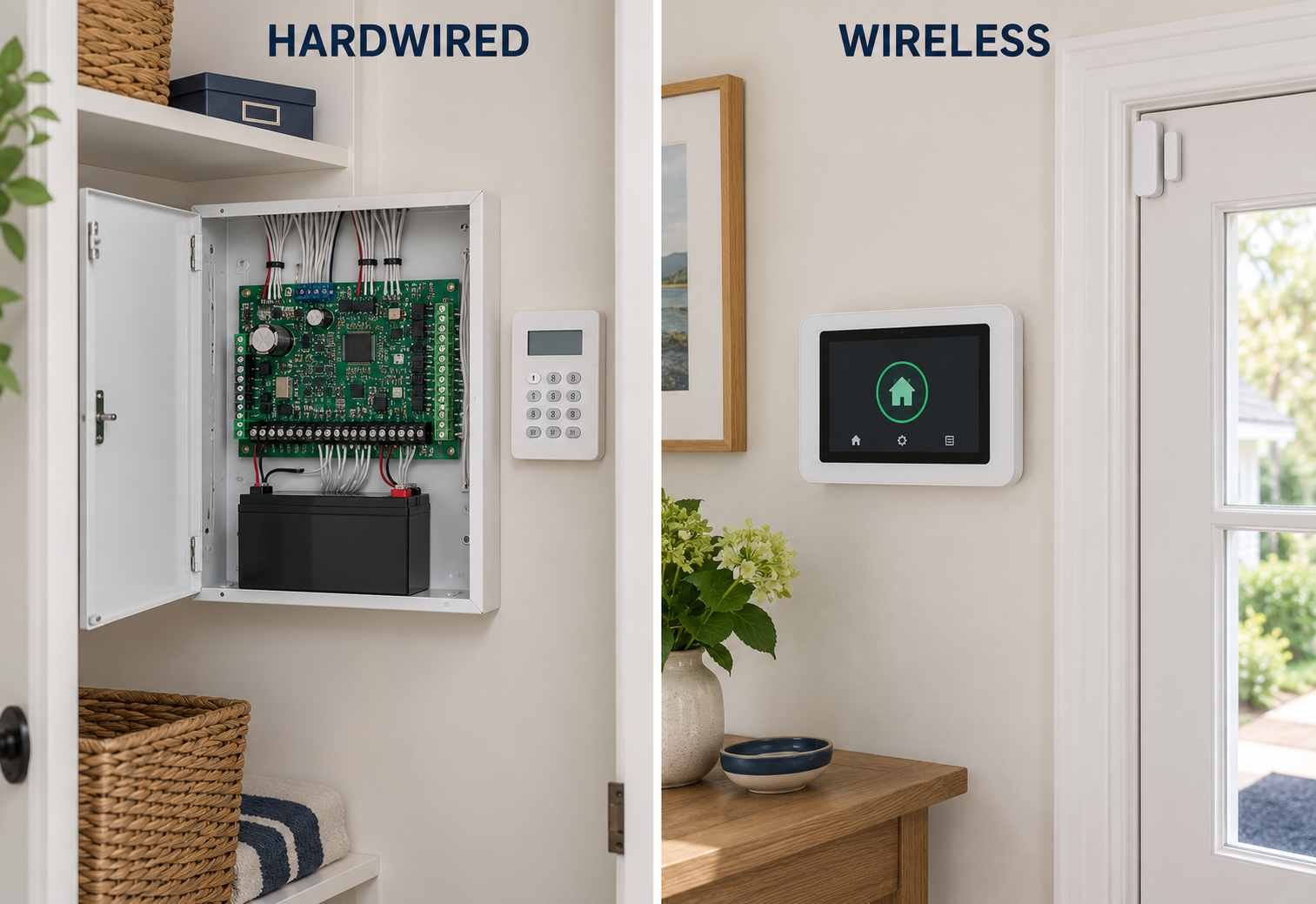
Which is better: wired or wireless?
Properly installed hardwired sensors on sound wiring generally have the edge for dependable communication and low routine maintenance: no individual sensor batteries and no sensor-to-panel radio link to lose. Wireless is usually easier to install in a finished home. A hybrid system keeps useful wiring and adds wireless devices where new cable would be difficult or expensive.
Wired vs. wireless vs. hybrid: at a glance
| What matters | Hardwired | Wireless | Hybrid |
|---|---|---|---|
| Sensor connection | Low-voltage cable to the panel or a wired expansion module. | Radio signals to a compatible panel or receiver. | A mix of wired and wireless connections. |
| Strongest fit | Sound existing wiring; new construction; accessible cable routes. | Finished homes, difficult cable routes, and many DIY installations. | Existing wired systems that need upgrades or added coverage. |
| Routine sensor service | No batteries in conventional wired intrusion sensors. | Periodic sensor battery replacement; attention to signal troubles. | Battery maintenance for the wireless devices. |
| Communication risks | Damaged cable, faulty connections, or failed devices. | Weak signal, interference, depleted batteries, or failed devices. | The risks associated with each connection type. |
| Installation disruption | Depends heavily on access behind finished surfaces. | Usually less disruption; secure mounting and testing still matter. | New cable only where it makes practical sense. |
| Adding protection | Needs a cable route and suitable panel capacity. | Needs compatible equipment, capacity, and verified signal coverage. | Choose the connection that suits each location. |
| Power outages | Depends on panel/power-supply backup and its condition. | The hub still needs backup power, even with battery-powered sensors. | Check backup for the panel and every powered module. |
| Apps & monitoring | Available with compatible control equipment, communicator, and service. | Available; features and backup communications vary by platform. | Available; sensor wiring does not decide the service features. |
Swipe the table sideways to compare all three options.
These are typical residential intrusion-system arrangements. Individual products and installations vary.
“Wireless” does not necessarily mean Wi-Fi
There are two different connections to understand. The first carries an event from a door contact, motion detector, or other sensor to the alarm panel. The second carries the alarm from the property to a monitoring service.
Wired versus wireless usually describes the first connection. Many wireless alarm sensors use a dedicated radio protocol rather than your home Wi-Fi. For example, SimpliSafe documents a dedicated RF connection for its alarm sensors and a separate Wi-Fi requirement for its cameras. [1]
The monitoring connection may use cellular, internet, another supported communication path, or a combination. A hardwired alarm can use cellular monitoring; a wireless alarm can continue receiving sensor signals when the router is offline. Whether an alarm then reaches the monitoring center depends on the communicator, coverage, power, and service plan.
Ask two separate questions: “How do my sensors reach the panel?” and “How does my panel reach the monitoring center if the internet fails?” The word wireless answers neither question completely.
Hardwired home security: pros and cons
A conventional hardwired alarm uses low-voltage cable for its field devices. Basic magnetic contacts do not need individual batteries; powered detectors, such as wired motion sensors, normally draw power from the alarm system’s power supply.
Where hardwired performs well
- Less routine sensor maintenance. You avoid replacing batteries across numerous doors, windows, and detectors.
- A consistent physical connection. Wired sensors do not suffer RF supervision loss or radio interference on the wired link.
- Long-term value from existing infrastructure. Working contacts and cable can remain useful when control equipment is upgraded.
- Discreet installation. Recessed contacts and concealed cable can be attractive when the building allows them.
Where hardwired takes more work
- Installation access. Finished ceilings, inaccessible walls, and ornate trim can make cable routes costly.
- Hidden faults. Damage behind a wall may take longer to locate than a visible defective device.
- Changes need planning. A new sensor may require more cable, expansion hardware, and labor.
- It still needs service. Backup batteries, power supplies, contacts, detectors, and connections can all deteriorate or fail.
Hardwired is a strong choice for an owner who wants fewer recurring service tasks. That advantage depends on competent installation and healthy wiring. It does not make an old, damaged system more dependable simply because it has cables.
Old wiring, ground faults, and mice: the tradeoff worth understanding
Older wired alarms can develop problems as insulation and connections deteriorate, particularly where moisture, heat, abrasion, or past building work have damaged the cable. In homes with rodent activity, mice can also reach concealed cable routes and chew wiring. University extension guidance specifically identifies wire chewing as a form of mouse damage. [2]
A ground fault is an unintended electrical path between alarm circuitry and earth or grounded metal. It is different from an open circuit, such as a broken conductor, or a short circuit, where conductors connect unintentionally. Damaged wiring can cause any of these; cable damage is not automatically a ground fault.
Finding a ground fault can be difficult. Cable may disappear into walls, several devices may share a circuit, and moisture-related problems may come and go. An alarm technician may need to isolate sections and test wiring and devices to locate the actual fault. A trouble indication does not necessarily pinpoint the damaged spot.
Some panels explicitly detect and report ground faults; others may respond differently to wiring problems. Bosch’s B9512G/B8512G documentation, for example, describes model-specific ground-fault detection and reporting. [3]
Age alone is not a reason to discard the wiring. Test it. If one cable run is unreliable and difficult to replace, using a compatible wireless sensor at that location may make more sense than replacing every working wired device.
Wireless home security: pros, cons, and DIY installation
Wireless sensors eliminate the need to run alarm cable to every protected opening. That can make a substantial difference in an occupied home, especially where the alternative involves opening finished surfaces.
Why most mainstream DIY alarm kits use wireless sensors
Wireless makes self-installation practical. A homeowner can mount sensors, enroll them, and test the system without fishing cable through walls or terminating a full set of wired zones. Easy setup is a major reason consumer DIY kits are built around wireless door, window, and motion sensors.
“Entirely wireless” needs a little qualification: the base station generally still needs a power connection, and cameras or accessories may need cables. Some DIY platforms also accept existing wired contacts through a retrofit module. Wireless sensors are the typical DIY approach, rather than a rule that every component in every DIY system is cable-free. [4] [5]
Where wireless performs well
- Finished homes. Usually less drilling and disturbance to walls or trim.
- Added coverage. It is easier to add a compatible sensor where no cable exists.
- Changing needs. Many devices can be relocated, subject to mounting and signal checks.
- Professional installation, too. Wireless is a connection method, not a synonym for DIY or low quality.
What owners need to maintain
- Sensor batteries. Replacement intervals depend on the model, activity, temperature, and operating conditions.
- Signal coverage. Distance, metal, masonry, and building changes can affect the radio path.
- Supervision troubles. A panel may report that a sensor has stopped checking in.
- Compatibility. A wireless sensor must match the panel’s supported protocol and equipment requirements.
What does “RF supervision loss” mean?
Supervised wireless devices check in with the system. If an expected check-in is missed for the configured supervision period, the panel can generate a trouble condition. Possible causes include a dead battery, a failed or removed device, poor coverage, or interference. The exact message and timing depend on the equipment and programming. DSC’s reference manual distinguishes wireless supervision, device low battery, RF delinquency, and communication troubles. [6]
Supervision is a useful safeguard, but a trouble still needs attention. Wired devices avoid this particular radio-link problem; they can have wiring faults or module communication troubles of their own.
Can wireless alarms be jammed?
Radio interference can disrupt a wireless connection. Better wireless technologies use features such as two-way communication, encryption, and frequency hopping to improve security and communication resilience. PowerG is one manufacturer-documented example. [7]
Encryption and resistance to interference are different protections. Encryption helps protect messages; it does not make a radio receiver immune to all interference or deliberate jamming. A sensible design considers signal coverage, supervision, equipment quality, and the monitoring connection together.
Hybrid security systems: keep the wiring that works
A hybrid alarm accepts both hardwired and wireless devices. For example, a home might keep its wired door contacts and motion detectors, then add wireless protection to an addition or a window with an inaccessible cable route.
DSC’s PowerSeries Neo is an example of a platform that supports hardwired and wireless zones with the appropriate equipment. This flexibility lets the installation fit the building. [8]
A direct wired zone and a wired-to-wireless converter are different
With a direct wired input, the sensor circuit connects to the panel or a wired expansion module. A wired-to-wireless converter retains the sensor cable but sends its status to the panel by radio. The converter can be a useful upgrade tool, but that part of the system now depends on an RF link and the converter’s power supply.
Before replacing an older alarm, have the existing devices and circuits assessed. A modern keypad alone does not repair damaged wiring. Equally, an old keypad does not mean every contact behind it needs replacement. Learn more about reusing an existing system through an alarm takeover.
Which costs more: wired or wireless home security?
The condition of the home often matters more than the label on the system. Running new cable through finished rooms can make wired installation more expensive. Reusing sound cable already in place can change that calculation substantially.
Compare quotes for the same protection: the same openings, areas, detector types, monitoring features, and backup arrangements. A small DIY kit and a professionally designed whole-home system may cover very different risks.
- Installation: sensor count, cable access, mounting, programming, testing, and any wall or trim repairs.
- Existing-system work: fault diagnosis, compatibility checks, replacement contacts, and control or communicator upgrades.
- Ongoing service: batteries, service visits, accessibility of devices, and what the maintenance agreement includes.
- Monitoring: the selected communication paths, response service, app features, and contract terms.
A house with 25 wireless sensors has 25 sensor battery locations to maintain, even if replacements are infrequent. That matters more when devices are difficult to reach or the property is a second home. Conversely, repeated investigation of a damaged hidden cable can outweigh the savings from avoiding a battery at that location.
Get a starting estimate: use Cunningham’s home security cost calculator, then request a formal quote that accounts for your property and any existing equipment.
Which system makes sense for your home?
| Your situation | Start by considering | What to check |
|---|---|---|
| Working wired alarm already installed | Retaining wired sensors; a control/communicator upgrade or hybrid system. | Test each device, circuit condition, and compatibility. |
| New construction or major renovation | Hardwiring accessible locations before walls close. | Coordinate cable routes, contact locations, and future expansion. |
| Finished home with no alarm cable | Professionally designed wireless, or selective wiring where access is easy. | Signal performance at each intended sensor location. |
| Rental or likely move | A wireless system suited to the space. | Landlord permission, mounting restrictions, and moving requirements. |
| Recurring trouble on one hidden cable | Repairing that circuit or replacing its coverage with compatible wireless. | Repair cost, root cause, and the condition of the remaining wiring. |
| Second home or extended absences | Sound wired or hybrid infrastructure where practical. | Remote trouble reporting, backup power, monitoring paths, and service access. |
Swipe sideways to read the full recommendation.
Consider the actual building, especially in New England
In Maine, New Hampshire, and Massachusetts, an older home may have useful basement access for wiring—or thick masonry, finished ceilings, and delicate trim that favor wireless. Metal mesh in plaster and other dense materials can also make an RF survey worthwhile. The age of the home is a clue to investigate, not a decision by itself.
For seasonal properties and unheated spaces, confirm that equipment is rated for the temperatures it will experience. If mice have entered a basement, attic, or crawlspace, address the entry problem as well as any damaged cable.
Plan for outages whichever sensors you choose
Ask how long the actual installed system can run on backup, which components are included, and what happens if broadband fails. An internet path may also need backup power for the modem and router. Cellular monitoring depends on coverage, the network, and a supported service plan. Battery-powered sensors alone do not keep a powerless hub operating.
Save this before getting quotes
Seven questions before replacing a wired alarm
Ask the installer to separate what can be kept from what should be repaired, modernized, or replaced.
- Which sensors and circuits passed testing? Ask for device-by-device results, rather than assuming everything works because the panel arms.
- What is causing the existing trouble? Is it a contact, connection, cable, power supply, communicator, or panel?
- Which wired zones can remain directly wired? Identify any proposed converter and its radio or power dependencies.
- Will every intended sensor have reliable coverage? Have wireless locations tested before final mounting.
- What survives a power or internet outage? Include the panel, powered modules, communicator, and network equipment where relevant.
- What maintenance will I be responsible for? Ask about batteries, service labor, trouble notifications, and device replacement requirements.
- Has the completed system been tested through to monitoring? Confirm accurate zone names and operator receipt of the intended signals.
Frequently asked questions
Are hardwired security systems more reliable?
With sound wiring and correct installation, hardwired sensors generally have fewer routine maintenance and communication issues: no individual sensor batteries and no RF link between the sensor and panel. Reliability still depends on the devices, wiring, power supply, backup battery, programming, and monitoring connection.
Do wired alarm systems need battery changes?
Conventional hardwired intrusion sensors usually do not. The control panel’s backup battery does, and additional power supplies may have their own batteries. “No sensor batteries” does not mean the entire alarm is maintenance-free.
Does a wireless alarm work without Wi-Fi?
Many wireless alarm sensors communicate with the panel by dedicated radio, so their local connection does not require Wi-Fi. Remote monitoring needs a working communication path. Cellular service can provide one when supported and activated; camera and app features may have different internet requirements.
Can an old wired alarm have an app and cellular monitoring?
Often, yes, with compatible control equipment, a supported communicator, and the appropriate service. Some systems can be upgraded; others need a panel replacement while retaining sound sensor wiring. See Cunningham’s Alarm.com monitoring and upgrade options.
Can I combine wired and wireless alarm sensors?
Yes, if the panel and supporting equipment accommodate both. A hybrid system can retain wired devices and add compatible wireless sensors. Wireless brands and protocols are not universally interchangeable.
Should old alarm wiring always be replaced?
No. Inspect and test it. Ring’s retrofit installation guidance, for example, calls for checking cable condition and testing wired zones; failed zones need repair before reuse. Age alone is less informative than evidence of damage, test results, and whether the wiring suits the proposed system. [9]
Should my security cameras also be wired?
Make that choice separately. Camera power, video bandwidth, recording location, and network connectivity differ from alarm-sensor requirements. You can use a wireless burglar alarm alongside wired cameras. Explore Cunningham’s security camera systems for that part of the design.
Cunningham Security • Since 1983
Find out what your home actually needs.
We design, install, monitor, and service home security systems in Maine, New Hampshire, and Massachusetts. Whether you have an older wired alarm or are starting fresh, we can evaluate the property and recommend a practical wired, wireless, or hybrid approach.
Have an existing system? Include its model or a clear equipment photo when you contact us.
Sources and technical references
- SimpliSafe: How products communicate — distinguishes alarm RF from camera Wi-Fi.
- Common Urban Pests: Identification, Prevention, and Control — university extension guidance, hosted by Texas A&M; includes mice chewing wiring.
- Bosch/Keenfinity: B9512G/B8512G ground-fault detection — a model-specific example, not a claim that all panels report faults identically.
- SimpliSafe: Base Station installation guide — power, backup, and monitoring arrangements.
- Ring: Retrofit Alarm Kit FAQs — support for compatible existing wired contacts.
- DSC: PowerSeries Neo trouble display reference — distinguishes supervision, battery, and communication conditions.
- PowerG technology overview — manufacturer explanation of two-way radio, encryption, and frequency hopping.
- DSC: PowerSeries Neo HS2064 — supports hardwired and wireless zones with appropriate hardware.
- Ring: Installing the Retrofit Alarm Kit — cable inspection, zone testing, and reuse limitations.
Product examples illustrate technical differences. Compatibility, available features, and service requirements must be checked for the particular equipment being installed.
