
What Is a Virtual Security Guard?
A virtual security guard is a professionally monitored video security service that uses cameras, intelligent event detection, and trained human operators to identify and respond to activity at a property. When a relevant event occurs, an operator can review live and recorded video, speak through an on-site speaker, contact authorities, notify a customized call list, and document the incident according to the property’s written response plan.
The best virtual guard systems do not ask people to stare at every camera continuously. They use carefully configured video analytics and security-system signals to bring the right event, from the right camera, to a human operator at the right time. The operator adds context that software alone cannot: Is the person a delivery driver or an intruder? Is the vehicle merely turning around or entering a closed yard? Does the event require a warning, a phone call, or immediate dispatch?
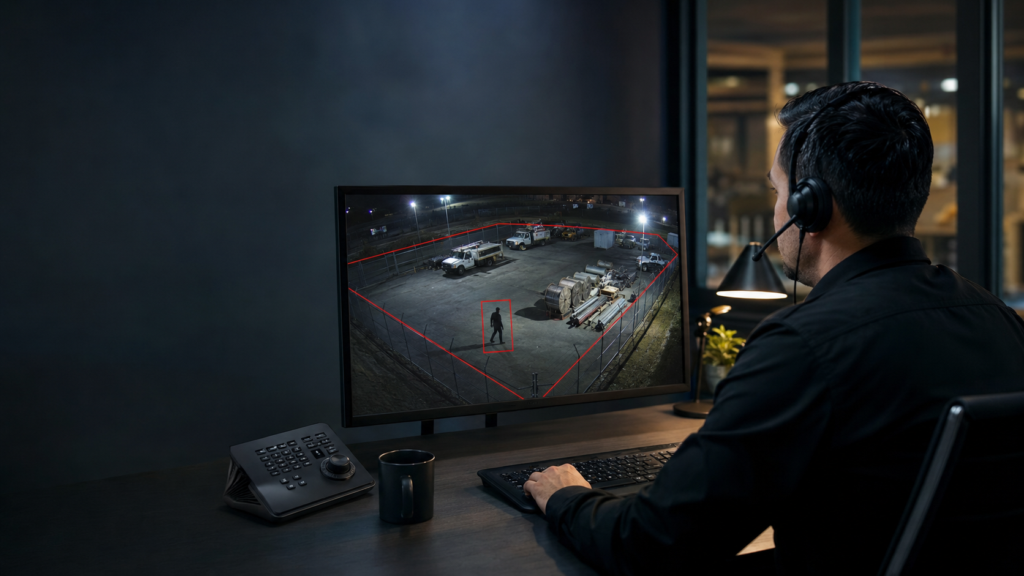
At Cunningham Security, we combine local site assessment, customized system design, professional installation, analytics programming, and ongoing service with live video monitoring through Affiliated Monitoring. Depending on the customer’s existing equipment and objectives, we can build the workflow with Alarm.com, CHeKT, or Affiliated’s Immix CS Enterprise integration. That flexibility allows us to monitor many existing professional camera and recorder systems instead of forcing every property into one brand or one standardized package.
Updated July 2026.
Virtual security guard essentials
- AI filters; people decide. Analytics identify potential events, while trained operators interpret the scene and follow approved instructions.
- It is usually event-based, not continuous surveillance. Operators receive selected analytics events, alarm signals, access events, panic activations, or scheduled guard-tour assignments.
- Site design determines event quality. Camera position, lighting, fencing, gates, schedules, object classification, and detection zones all affect what reaches an operator.
- Response is customizable. A plan may include two-way talkdown, lights or sirens, police dispatch, a site contact, and a call list in a property-specific order.
- Secured and unsecured sites are priced differently. Open properties normally generate more legitimate activity and operator work than fenced, gated, or otherwise controlled spaces.
- Video and intrusion protection are stronger together. Cameras can detect suspicious activity before a break-in, while alarm, access-control, and panic signals can trigger an immediate operator review.
What Does a Virtual Security Guard Actually Do?
A virtual security guard extends a professionally monitored security system into areas where conventional alarm sensors may be too late or impractical. An intrusion alarm usually reports that a protected door opened, glass broke, or motion occurred inside a building. Proactive video monitoring can identify a person or vehicle approaching a restricted area before anyone reaches the building.
The service can include several related workflows:
- Proactive video monitoring: An analytics rule detects selected activity, such as a person entering a closed equipment yard, and sends the event to an operator.
- Video verification: A burglar-alarm signal, panic button, or other system event prompts the operator to review the associated camera. Our separate guide explains how video verification works with alarm systems.
- Virtual guard tours: Operators perform scheduled, randomized, or event-assisted checks of designated cameras to look for specified conditions.
- On-demand assistance: A user presses a panic button or requests help, allowing an operator to view the scene and follow the approved response.
- Remote concierge or gate support: An operator visually verifies a visitor and, when the system and procedures allow it, communicates with the visitor or controls an approved door or gate.
These terms are sometimes used interchangeably online, but they are not identical services. A phone notification is not professional monitoring. A recorded clip is not the same as a live operator response. A scheduled camera tour is not the same as a person-detection event. Cunningham defines exactly which cameras and signals are monitored, when monitoring is active, and what the operator may do.
How Does a Virtual Security Guard Work?
A well-designed virtual guard service follows a six-part workflow:
- A relevant condition occurs. A camera may detect a person, vehicle, line crossing, prolonged presence, or movement in a protected zone. An alarm panel, door sensor, access-control system, or panic button can also create the event.
- The system applies context. Rules can consider the time of day, operating schedule, object type, direction of travel, armed status, location within the image, or how long an object remains in an area.
- The event reaches the monitoring platform. The operator receives the appropriate camera, event type, site name, zone, pre-event clip when supported, live view, and account instructions.
- A trained person evaluates the scene. The operator determines whether the activity appears normal, uncertain, dangerous, or clearly unauthorized.
- The operator follows the site’s response plan. Available actions can include live talkdown, warning sounds, lights, calling authorities, contacting a site representative, or notifying a call list.
- The event is documented. Operator actions, notifications, and available video evidence create an incident record for later review.
This event-based model is important. In most applications, an operator is not continuously watching a wall of video from your property. Software directs attention to a defined event, and a person handles it. Continuous observation can be designed for specialized needs, but it is different in scope and cost from standard proactive video monitoring.
Why Custom AI Analytics Plus a Human Operator Is the Best Combination
AI video analytics and human operators solve different problems. Analytics can evaluate many camera views consistently and detect patterns such as a person crossing a virtual line, a vehicle entering a zone, or someone remaining near a gate after hours. A human can interpret intent and context, communicate, and make a judgment within the customer’s response rules.
Neither part is as effective alone. Basic motion detection can produce an event for shadows, blowing branches, insects, rain, or headlights. Modern object analytics can reduce that noise, but even a perfectly classified event can still be irrelevant. A system may correctly identify a person walking on a public sidewalk; that is a true detection, but it is not necessarily a security event.
We call this the difference between a technical false alarm and a nuisance true positive:
- A technical false alarm occurs when the system mistakes a non-target object or visual condition for the selected event.
- A nuisance true positive occurs when the technology identifies the object correctly but the activity is ordinary and not actionable.
This distinction is one of the most important parts of virtual guard design. Improving the camera or analytic can reduce technical errors. Reducing nuisance events often requires a better zone, a different schedule, a directional tripwire, a longer loiter threshold, a physical gate, or a clearer definition of what should reach an operator.
The goal is not to generate the most alerts. It is to generate the smallest reliable set of alerts that represents activity a person may need to handle.
How Customized Call Patterns and Operator Response Plans Work
A virtual security guard should not rely on a vague instruction to “do something if a person appears.” Cunningham develops a response matrix: a written decision tree that tells the monitoring operator how to handle different event types, locations, schedules, and apparent threat levels.
| Observed condition | Possible operator action | Follow-up |
|---|---|---|
| Person enters the protected yard after closing and no immediate violence is visible | Open live video and deliver an approved two-way warning, such as: “This is security. The property is closed and is being monitored. Please leave immediately.” | If the person does not leave, follow the dispatch instruction and then notify the designated call list. |
| Person appears to be forcing a door, cutting a fence, carrying a weapon, or stealing equipment | Follow the account’s urgent-event procedure, which may call for immediate authority notification instead of waiting for talkdown. | Provide useful live details when permitted, then notify the customer’s emergency contacts. |
| Known employee arrives during an approved exception | Verify the available context and resolve according to the authorized-user procedure. | Document the event or notify a manager only when the plan requires it. |
| Image is inconclusive because of weather, obstruction, or poor lighting | Check mapped views or available recorded context and follow the plan for uncertain events. | Contact an authorized person, dispatch, or close the event according to site instructions. |
The sequence can be customized. One customer may want the operator to use two-way voice, call authorities if the person remains, and then work through a contact list. A high-risk facility may direct the operator to contact authorities immediately for a forced entry and use talkdown only when safe and appropriate. Another site may want a manager called first for an unknown vehicle outside normal hours.
A useful response plan answers operational questions before an incident:
- Which cameras, zones, and hours are covered?
- What behavior qualifies for live talkdown?
- What exact warning language should an operator use?
- Which events require immediate dispatch?
- Should authorities be called before or after the contact list?
- Who is authorized to cancel, extend, or change monitoring?
- What are the exceptions for employees, tenants, contractors, deliveries, snow removal, or emergency service?
- May an operator activate a siren, turn on a light, unlock a door, or open a gate?
- How should an uncertain event be handled?
Talkdown also needs to be tested as a physical system. An IP speaker that sounds clear in a quiet office may be unintelligible in a windy yard near machinery or traffic. We test speaker position, volume, delay, coverage, and message clarity under realistic site conditions.
How Virtual Guard Works with Alarm Systems and Access Control
Virtual guard and a traditional professionally monitored alarm system cover different stages of an incident:
- Video analytics can detect the approach. A person entering a restricted yard or walking toward a rear loading door can be identified before the building is breached.
- Intrusion sensors can confirm the breach. A door contact, glass-break detector, or interior motion sensor provides a separate physical signal if entry occurs.
- Alarm signals can trigger operator video review. The operator can receive the relevant live or recorded camera view when a mapped alarm zone activates.
- Access events add identity and timing. A valid credential, denied credential, forced door, held-open door, or out-of-schedule entry can add context to the video.
- Automation can support response. Compatible platforms can coordinate lights, locks, doors, arming status, and selected operator actions when properly configured and authorized.
For example, imagine a warehouse with an armed intrusion system, employee access control, and monitored exterior cameras. At 1:30 a.m., an analytics rule identifies a person moving from the public edge of the property toward a rear door. The event reaches an operator. Moments later, the rear-door contact activates without an authorized credential. The combination of exterior video, a door alarm, and access history provides much stronger context than any one signal by itself.
Alarm.com is particularly useful when a customer wants video, intrusion detection, and access control in one connected ecosystem. Cunningham supports thousands of Alarm.com subscribers, so our team has practical experience with both everyday user needs and more advanced integrated workflows.
Can a Virtual Guard Work with Existing Cameras?
Often, yes. The answer depends on the camera or recorder model, firmware, network access, available event interfaces, video stream, desired analytics, and the monitoring workflow. Consumer cameras locked to a proprietary cloud may not integrate, and an available video stream does not automatically carry the analytics metadata or controls required for every service.
Cunningham is not limited to one technical route. We can use Alarm.com, CHeKT, or the Immix platform used by Affiliated Monitoring, depending on the site.
Alarm.com
Alarm.com is often the best fit for a new or expanding integrated system. Compatible cameras use video analytics that can distinguish people, animals, and vehicles, apply tripwires or ground zones, and follow customized schedules. Alarm.com’s remote video monitoring tools can send selected people or vehicle events to monitoring operators. On compatible enrolled cameras, operators can use live view, two-way talkdown, warning sounds, and approved property actions.
The platform’s larger advantage is integration: cameras, alarm sensors, arming status, access control, locks, lights, and user activity can work within the same environment. Read our Ring Virtual Guard vs. Alarm.com Video Monitoring comparison for a detailed look at how this professional approach differs from a standardized consumer service.
Source: Alarm.com Video Analytics and Alarm.com Remote Video Monitoring overview.
CHeKT
CHeKT can be an excellent bridge when a property has professional cameras and needs to turn selected video events into monitored security signals. Its Video Control Panel is designed to connect professional security cameras with alarm panels, IP speakers, cloud software, and AI-assisted event handling. That can be useful when the right answer is to preserve suitable camera equipment while adding analytics, health supervision, live operator review, and proactive audio response.
CHeKT should not be understood as a promise that every camera exposes every feature. We confirm stream compatibility, resolution, recorder behavior, networking, event handling, and desired operator functions during design.
Source: CHeKT Proactive Visual Security.
Immix CS Enterprise through Affiliated Monitoring
Immix is a monitoring-center video platform rather than a consumer camera brand. Affiliated Monitoring states that its custom Immix CS Enterprise integration supports hundreds of video systems and standards and can integrate almost any camera or NVR for live agent monitoring and response. This route can make it possible to monitor an existing multi-brand or higher-end video system when replacing the entire camera deployment would be unnecessary or wasteful.
The phrase “almost any system” still requires an engineering review. Video may be technically viewable while a requested function—pre-event clips, camera health, two-way audio, analytics metadata, PTZ control, or an alarm association—is unavailable. Cunningham evaluates the complete outcome, not merely whether a stream can appear on a screen.
Affiliated’s interactive video service also supports video verification, AI analytics alarms, two-way audio and talkdown, video guard tours, wide-area monitoring, virtual doorman functions, and incident reporting. Its published platform list includes Immix CS, Alarm.com, and CHeKT.
Source: Affiliated Monitoring InView Interactive Video Monitoring.
Secured vs. Unsecured Outdoor Spaces
Physical boundaries are not separate from smart video; they provide context that makes smart video more effective.
A secured outdoor space may be enclosed by a gate, fence, wall, protected courtyard, building line, or controlled access point. The system can focus on activity after someone crosses a clear boundary. A person inside a locked equipment yard at 2:00 a.m. is much more likely to require attention than a person on the sidewalk outside it.
An unsecured or semi-public space may include an open parking lot, storefront sidewalk, shared driveway, apartment entrance, marina approach, or business next to a public road. These locations can still be monitored effectively, but their normal traffic creates more events that must be separated from suspicious activity.
| Factor | Secured or controlled property | Open or semi-public property |
|---|---|---|
| Event meaning | Crossing the boundary often provides a strong indicator of unauthorized activity. | A detected person or vehicle may be a customer, neighbor, pedestrian, delivery, or passing traffic. |
| Analytics design | Rules can often focus on the private side of a gate, fence, or controlled entrance. | Rules usually need tighter zones, direction, schedules, loiter thresholds, and exclusions. |
| Expected operator volume | Usually lower when legitimate after-hours entry is rare. | Usually higher because normal public or shared activity may need review. |
| Pricing tendency | Often less expensive to monitor when the site produces a small number of meaningful events. | Often more expensive when broader coverage or greater event-handling capacity is required. |
A fence is not automatically secure, and an open property is not automatically unsuitable. Camera angles, blind spots, lighting, gate discipline, landscaping, snow storage, employee behavior, and the quality of the rules still matter. See our Perimeter Control service for more on using protected boundaries and live video response together.
How Much Does a Virtual Security Guard Cost?
Virtual security guard cost depends less on a simple camera count than many buyers expect. The largest recurring variable is often event economics: how frequently the system asks a trained person to review video, how long each event takes, and what the operator must do.
Cunningham Perimeter Control monitoring starts at $99 per month for a qualifying property. That starting price is not a promise that every site, every camera count, or unlimited operator activity costs the same. We review the property before quoting the appropriate service.
Factors that can affect equipment, installation, or monthly pricing include:
- The number and type of cameras enrolled for operator monitoring
- The monitoring schedule and number of protected hours
- Expected operator-reviewed event volume
- Whether the site is fenced, gated, controlled, open, or adjacent to public traffic
- Two-way audio, warning devices, lighting, or other response equipment
- Alarm, panic-button, and access-control integration
- Scheduled or randomized virtual guard tours
- Existing-system compatibility and required interface equipment
- Internet bandwidth, network changes, power backup, storage, and redundancy
- Reporting, retention, and specialized response requirements
This explains why a two-camera fenced yard with rare after-hours activity can cost less to monitor than a single open camera covering a busy public-facing entrance. One camera can create more operator work than ten carefully designed cameras.
Virtual guard is often substantially less expensive than staffing a physical guard for the same hours, especially across multiple views or locations. However, it is not a complete physical substitute when a site needs hands-on inspections, package handling, escort duties, first aid, physical access enforcement, or an immediate on-site presence.
Virtual Security Guard vs. Security Cameras, Alarm Monitoring, and On-Site Guards
| Approach | What it does well | Primary limitation |
|---|---|---|
| Self-monitored cameras | Record evidence and send the owner app notifications. | The customer must notice, interpret, and handle the event personally. |
| Traditional alarm monitoring | Responds reliably to door, motion, glass-break, panic, fire, and other panel signals. | May not see what caused the signal or detect activity before entry. |
| Virtual security guard | Combines intelligent event detection, visual context, human judgment, remote intervention, and documented response. | Depends on camera visibility, connectivity, equipment health, and a well-designed event workflow. |
| On-site security guard | Provides a physical presence and can perform hands-on tasks or patrol areas cameras cannot see. | Usually costs significantly more per protected hour and can observe only one place at a time. |
For many properties, the strongest answer is layered: a professionally installed security camera system, monitored intrusion protection, and virtual guard coverage for the most important exterior or operational areas. A physical guard can still be added during particular hours or events where an on-site person is necessary.
Where Does Virtual Guard Monitoring Work Best?
Virtual security guards are especially useful where important property is exposed after hours, where travel time prevents an owner from responding, or where several camera views must be evaluated quickly.
- Equipment and contractor yards: Detect people or vehicles after hours, use talkdown, and protect tools, fuel, trailers, copper, and machinery.
- Auto dealerships: Monitor vehicle rows, building approaches, key areas, and service lots while excluding adjacent road traffic.
- Construction sites: Adapt zones as fencing, materials, and work areas change through the project.
- Warehouses and loading docks: Combine video with door contacts, schedules, access events, and interior intrusion detection.
- Marinas and boatyards: Watch docks, gates, storage areas, fuel locations, and seasonal property while accounting for water reflections and weather.
- Multifamily properties: Address entries, garages, package areas, and restricted spaces without treating every resident or guest as suspicious.
- Retail and restaurants: Support openings, closings, panic events, rear doors, deliveries, and lone-worker situations.
- Second homes and estates: Add proactive exterior awareness to conventional home alarm protection.
- Vacant buildings: Monitor approaches and entry points when legitimate activity is limited and changes should be easy to identify.
Not every camera belongs in a virtual guard plan. High-traffic views with no defensible rule may be better used for recording and investigation, while selected entrances, yards, or approach paths receive operator monitoring. This keeps the service focused and economically sustainable.
What Separates a Good Virtual Guard System from a Poor One?
A virtual guard is an operational system, not a subscription added to random cameras. Cunningham’s local design and installation process focuses on the complete chain from detection to response.
1. Cameras are positioned for decisions, not just coverage
A wide overview can show that something happened but may not show enough detail to decide what it was. We plan views around approaches, choke points, entrances, asset areas, and likely directions of travel. When possible, one view detects the approach and another provides identification or confirmation.
2. Day and night conditions are both tested
A good daytime image does not guarantee a useful nighttime image. Headlights, infrared reflection, rain, snow, fog, insects, backlighting, and changing seasonal foliage can alter performance. Commissioning should include day and night walk tests with people and vehicles traveling realistic paths.
3. Analytics are tuned after normal traffic is observed
Initial programming is a starting point. The rules should be reviewed after the system sees actual employees, deliveries, animals, weather, and public traffic. A few careful changes to zone edges, target size, direction, timing, or schedule can be more valuable than adding another camera.
4. The operator receives usable context
The correct event name, camera label, site map, adjacent views, contact information, and response instruction matter. “Motion at camera 7” is poor operational information. “Person inside east equipment yard after closing; review east gate and loading-bay views” is much more useful.
5. Network and power are treated as security components
Cameras, encoders, recorders, network switches, routers, speakers, and alarm interfaces must remain powered and connected. Depending on the site, that can require hard-wired PoE, UPS backup, network segmentation, health supervision, local recording, and an appropriate secondary communication strategy.
6. The system is maintained as the property changes
New fencing, parked trailers, stacked materials, construction, tree growth, snowbanks, lighting changes, or a different delivery route can affect coverage and event volume. Local service matters because a monitoring plan cannot compensate for a blocked lens, failed speaker, moved camera, or outdated response list.
This is why Cunningham blends local customized design, installation, testing, and ongoing support with the scale of Affiliated Monitoring’s professional video operations. Customers get a system engineered around the property and trained operators available to handle the selected events.
Virtual Guard Privacy and Customer Video
Professional monitoring requires carefully limited access. The system should define which cameras are enrolled, when operators may view them, what events permit access, how activity is logged, and how long relevant footage is retained.
Cunningham does not sell customer data, use customer footage for advertising, or treat video as a secondary business product. We do not provide customer footage to outside parties except at the customer’s direction, as needed to deliver the authorized security service, or when legally required. We design monitoring around the cameras and hours the customer approves and can use privacy zones or limited camera enrollment where supported.
Customers should also consider appropriate signage, employee or tenant policies, audio-recording rules, retention, credential control, and applicable state or local law. Camera placement should protect the customer’s property without unnecessarily viewing private neighboring areas.
Frequently Asked Questions About Virtual Security Guards
Is a virtual security guard a real person?
Yes. The “virtual” part means the operator is remote, not that the entire service is automated. AI or another system trigger directs an event to a trained monitoring operator, who reviews the video and follows the property’s instructions.
Are virtual guards watching my cameras all the time?
Usually not. Most virtual guard services are event-based: operators access selected cameras when an approved analytics, alarm, panic, access, or guard-tour event occurs. Specialized continuous observation can be designed separately and carries different staffing and cost requirements.
Can a virtual security guard call the police?
Yes, when the service, event, account instructions, and applicable procedures call for dispatch. The operator may also use two-way talkdown, activate supported warnings, contact a site representative, and work through a customized call list. The exact order is defined in advance.
Can a virtual guard stop a crime?
A virtual guard cannot physically restrain someone, but early detection and live talkdown can interrupt behavior before a break-in or theft is completed. When a threat continues, the operator can escalate according to the response plan and provide more useful visual information than an alarm signal alone.
Can Cunningham monitor my existing camera system?
Often. Cunningham can use Alarm.com, CHeKT, or Affiliated Monitoring’s Immix integration to support a wide range of camera and NVR systems. We first verify the specific equipment, video streams, networking, analytics, audio, event, and health-monitoring requirements. Proprietary or obsolete equipment may need an interface or replacement.
What is the difference between virtual guard and video verification?
Video verification normally begins with another alarm signal, such as a door contact or motion detector, and uses video to determine what caused it. Proactive virtual guard monitoring can begin with a video analytics event before a conventional alarm occurs. A well-designed system can use both.
Why does a fenced property usually cost less to monitor?
A gate or fence creates a meaningful boundary, so fewer ordinary pedestrians and vehicles enter the monitored zone. That generally produces fewer operator-reviewed events. Open or public-facing sites can still be protected, but they often need more careful analytics and greater event-handling capacity.
How much does a virtual security guard cost?
Cunningham Perimeter Control monitoring starts at $99 per month for qualifying properties. The final price depends on monitoring hours, event volume, site boundaries, camera count, response actions, integrations, and equipment. A site assessment is the best way to determine an accurate price.
Is a virtual security guard better than an on-site guard?
It depends on the job. A virtual guard can evaluate several cameras quickly, provide consistent event records, and often protect a site for far less than full-time on-site staffing. A physical guard is better when the work requires hands-on patrols, escorts, deliveries, physical intervention, or an immediate on-site presence. Some properties use both.
Does virtual guard work for homes as well as businesses?
Yes. Homes, second homes, detached garages, long driveways, waterfront properties, and estates can benefit from proactive video monitoring. The same design principle applies: monitor a well-defined private area and create response instructions that match the household.
Get a Virtual Security Guard Plan Designed for Your Property
The right question is not only, “Which camera should I buy?” It is: What activity should create an event, what context should the operator receive, and what should happen next?
Cunningham Security designs that complete workflow. We assess the site locally, determine whether existing cameras can be used, select Alarm.com, CHeKT, Immix, or higher-end equipment when appropriate, program the analytics, integrate the alarm or access-control system, test operator communications, and maintain the system after installation. Live video events are handled through Affiliated Monitoring under the customized response plan we build with you.
If you are protecting a home, business, yard, marina, dealership, construction site, warehouse, multifamily property, or another outdoor space in Maine, New Hampshire, or Massachusetts, request a customized virtual guard quote from Cunningham Security or review our complete video monitoring and virtual guard services.
