
Why Fences and Gates Improve Outdoor Video Monitoring
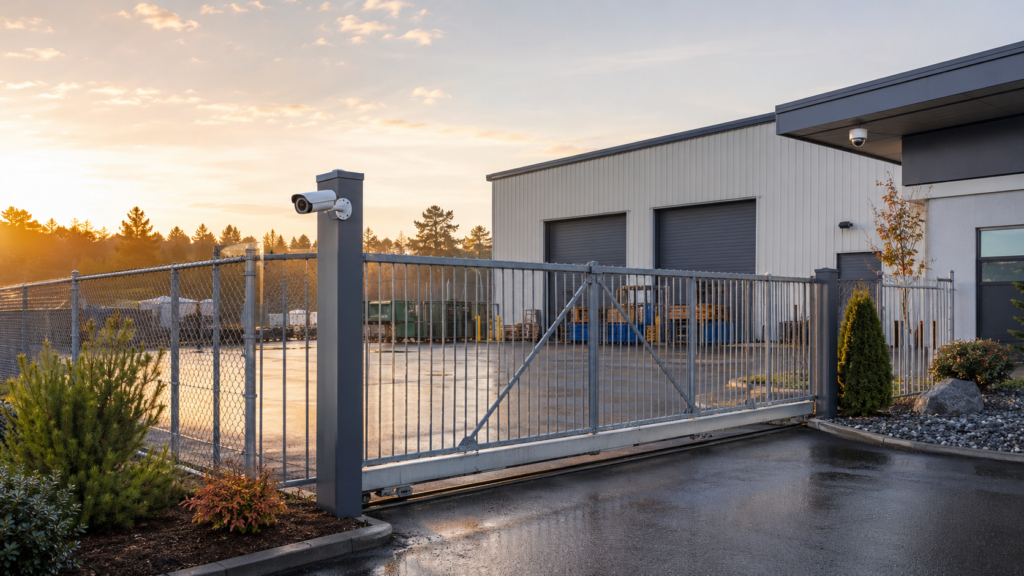
The most useful way to think about this is as a layered system:
- A fence or gate creates the physical perimeter.
- Cameras and analytics create the video perimeter.
- The alarm and access-control system protect the building, doors, and critical assets behind it.
No one layer is perfect. Used together, they improve deterrence, detection, delay, verification, and response.
First: Fences and Gates Are Helpful, Not Necessary
It is worth stating this plainly because outdoor video monitoring is sometimes presented as though it only works inside a fenced yard. That is not true.
An unfenced home, dealership, marina, apartment building, office, retail property, or construction site can still use intelligent video rules. Cameras can detect a person approaching a rear door, a vehicle entering a driveway, or someone remaining near stored equipment after hours. Schedules, directional rules, object classification, and carefully drawn detection areas can separate much of that activity from the background.
A fence simply gives the technology and the operator more context. It turns an invisible software boundary into a visible physical boundary. A person walking near an open parking lot may have many legitimate reasons to be there. A person who has crossed a closed gate and is standing inside a private yard at 2:00 a.m. is easier to evaluate.
When a fence is impractical, undesirable, prohibited, or simply unnecessary for the property, Cunningham can design the security camera system around the boundaries that do exist: driveways, curbs, building lines, landscaping, lighting transitions, controlled doors, and normal traffic patterns.
Why Fences Create Clearer AI and Analytics Events
Outdoor video analytics can detect conditions such as:
- A person or vehicle crossing a virtual tripwire
- A person entering a defined ground zone
- Movement in a selected direction
- Someone remaining in an area beyond a set amount of time
- Activity during a closed or armed schedule
- An alarm, panic, gate, or access-control event that requires video review
Compatible Alarm.com video analytics, for example, can distinguish among people, animals, and vehicles and apply tripwire or ground-zone rules. Other professional platforms offer similar concepts with different equipment and capabilities.
The challenge is not only determining what the camera sees. The system also needs to determine whether that activity matters.
A camera may correctly detect a real pedestrian beside an open property. Technically, the analytics worked. Operationally, the event may be irrelevant. This is different from a false detection caused by a shadow, branch, headlight, insect, or changing weather.
- False detection: The system identifies something that is not actually the selected person, vehicle, or event.
- Irrelevant true detection: The system correctly identifies a person or vehicle, but the activity is normal and requires no response.
Better analytics can reduce the first problem. Better site design reduces the second. Fences and gates help because they keep more ordinary activity outside the protected zone and channel authorized activity through known openings.
How Fences and Gates Reduce Operator Events
In an event-based virtual security guard system, operators are not normally staring at every camera continuously. A selected analytics or security-system event directs their attention to a camera, clip, or live view.
Every event sent for review requires time and judgment. The operator may need to watch pre-event footage, open a live view, check an adjacent camera, issue a warning, contact authorities, or notify a call list. Even an event that is resolved as harmless still consumes attention.
A secured yard usually generates fewer operator events because fewer people and vehicles enter the monitored area legitimately after hours. This improves what we sometimes call event quality: the percentage of events that represent activity worth reviewing.
Consider two properties with the same number of cameras:
- Property A has a closed fence and one locked vehicle gate. After 8:00 p.m., almost nobody should be inside. A person crossing a video line several feet inside the fence is unusual.
- Property B has an open parking area beside a sidewalk, a neighboring business, and an active shared driveway. The cameras may see many real people and vehicles that pose no threat.
Property B can still be monitored, but it needs narrower zones, more careful directions and schedules, and possibly a different monitoring plan. The important difference is not camera count. It is the amount of activity the system must interpret.
Fewer unnecessary events can also affect monitoring design and price because operator workload is a real service input. A fence does not guarantee a particular price, but secured and unsecured properties should not automatically be treated as identical.
Three Complementary Layers: Physical Perimeter, Video Perimeter, and Alarm Protection
| Security layer | Primary purpose | What it contributes | What it cannot do alone |
|---|---|---|---|
| Fence and gate | Create a visible physical boundary | Deter casual entry, channel movement, restrict access, and delay an intruder | Confirm who crossed, determine intent, or summon a response |
| Video perimeter | Detect and visually evaluate activity | Identify selected crossings or behavior, provide context, support live talkdown, and document events | Physically prevent entry or detect every interior condition |
| Alarm and access-control system | Protect gates, doors, buildings, and critical points | Report forced openings, intrusion, panic, or access events and trigger operator video review | Always show what caused the signal or detect the earliest approach |
The sequence matters. A fence can slow and channel a person. The video system can detect that person while there is still distance between the boundary and the building. A trained operator can evaluate the scene and, when the plan and equipment allow it, use an audible warning. If the person continues and opens a protected gate or door, the monitored alarm system supplies another signal and another opportunity for verification and response.
The alarm is better described as the last line of detection and response than as a physical barrier. Its siren and visible devices may deter, but its larger role is to report that a protected point has been breached. Our guide to video verification with alarm systems explains how operators can use camera footage to add context to those signals.
Why a Gate Is Such a Valuable Monitoring Point
A gate is a natural choke point. It brings authorized and unauthorized traffic through a more predictable part of the property, which creates several design opportunities:
- An overview camera can show a vehicle or person approaching and entering.
- A second camera can capture a more useful identification view.
- A directional tripwire can distinguish entering from leaving.
- A gate contact can report an opening when the property is closed.
- An access control system can add credential, schedule, and denied-access information.
- A speaker can be aimed toward the waiting or entry area for clearer live talkdown.
- Lighting can be concentrated where people and vehicles naturally stop.
When those elements are integrated, an operator may be able to see that a vehicle entered, determine whether an authorized credential was used, review an alarm or access event, and follow the property’s customized response instructions.
Gate design still matters. A camera should not be placed where an open gate blocks the view. A card reader, keypad, intercom, or license-plate view must be positioned for the actual approach path. Tailgating, gates left open, pedestrian gaps, snow accumulation, and delivery procedures all need to be considered.
How Outdoor Video Monitoring Works Without a Fence
An open property needs a video perimeter that is based on behavior and location rather than a physical enclosure. Useful design techniques include:
- Pointing cameras inward so roads, sidewalks, and neighboring activity occupy less of the image
- Placing virtual tripwires across actual approach paths instead of the entire front edge of the property
- Using direction so a person walking parallel to the property is treated differently from someone moving toward a building
- Using a ground zone and dwell time to identify loitering rather than every brief crossing
- Running operator-monitoring rules only during hours when the activity is unusual
- Separating customer notifications, recording rules, and operator events instead of sending everything to everyone
- Using the alarm’s armed state, door sensors, panic devices, or access events as additional context
- Adding visible lighting, signage, or speaker coverage where appropriate
For example, an unfenced dealership beside a public sidewalk should not send an operator every time a pedestrian appears at the edge of the image. A better rule may monitor people who move beyond the customer parking area toward vehicle rows after closing or who remain near a restricted door for a selected period.
A long residential driveway can use a directional vehicle rule well inside the property rather than at the road. A marina can focus on ramps, dock entrances, storage buildings, and fuel areas instead of trying to treat every movement on the water as suspicious.
These are examples of why professional placement and programming matter. The absence of a fence changes the design problem; it does not eliminate the solution.
Practical Details That Determine Whether the Layers Work
Do not place the analytics line directly on the fence
In many layouts, a virtual tripwire works better a short distance inside the protected area. This reduces events caused by pedestrians or vehicles moving just outside the fence and gives the camera a clearer view of someone who has actually entered.
Watch for infrared reflection and patterned fencing
A camera looking through chain-link mesh can produce glare, focus problems, or a distracting pattern at night, especially when infrared illumination reflects from material close to the lens. The answer may be a different mounting point, external lighting, or a camera placed on the protected side of the fence.
Do not create hiding places along the boundary
Trailers, dumpsters, stacked materials, vegetation, and snowbanks can block the view or help someone approach unseen. A clear zone along important portions of the perimeter improves both physical visibility and camera analytics.
Test speaker coverage where the event occurs
An outdoor speaker should be intelligible at the gate, yard, or approach area—not just loud beside the building. Wind, traffic, machinery, distance, and network delay can all affect live talkdown. A realistic walk test is more useful than checking the speaker from a quiet equipment room.
Test in the conditions the site actually experiences
Daytime commissioning is not enough. Headlights, rain, snow, fog, insects, shadows, seasonal foliage, and changing piles of equipment can alter the scene. Cunningham tests and adjusts camera views and analytics, then revisits rules when real site activity reveals a better threshold or zone.
Maintain the entire chain
The fence, gate hardware, camera, network switch, router, recorder, speaker, alarm interface, and response list are all part of the security workflow. A perfect analytics rule cannot help if the lens is blocked, the gate never closes, the network is down, or the operator instructions name an employee who left two years ago.
How Cunningham Designs the Physical and Video Perimeters Together
Cunningham Security begins with the property rather than a fixed camera package. We look at how people and vehicles normally move, where public access ends, which assets matter most, what happens after hours, and how much time exists between the property edge and the building.
From there, we determine which events should simply be recorded, which should notify the customer, which should trigger an alarm verification, and which should reach a live operator. Depending on the existing equipment and required integrations, Cunningham can use Alarm.com, CHeKT, Affiliated Monitoring’s Immix CS integration, or other professional camera systems.
For live video events, Cunningham works with Affiliated Monitoring, whose interactive video capabilities include analytics-triggered alarms, live operator review, two-way audio and talkdown, guard tours, and wide-area monitoring. Cunningham provides the local design, installation, programming, testing, and support that determine what those operators receive and what they are instructed to do.
A fenced site may allow us to build a very selective monitoring plan around a gate and interior yard. An open site may need additional schedules, directional rules, loitering conditions, or alarm integration. Neither approach is automatically right or wrong. The design should match the property.
That is the idea behind Cunningham Perimeter Control: use physical layout, intelligent cameras, human review, and the rest of the security system as coordinated layers rather than unrelated products.
Frequently Asked Questions
Do I need a fence for outdoor video monitoring?
No. Cameras can monitor open properties using carefully placed views, virtual tripwires, ground zones, schedules, object classification, and other security-system signals. A fence can improve event quality, but it is not a requirement.
Does a fence eliminate false alarms?
No. Weather, lighting, insects, reflections, poor positioning, and incorrect analytics settings can still create unwanted events. A fence is most helpful in reducing ordinary people and vehicles inside the monitored area and creating clearer context for the system.
Why does a fenced property usually create fewer operator events?
A fenced or gated space normally has less legitimate after-hours traffic. Analytics can focus on people or vehicles that cross into the private area, so fewer ordinary sidewalk, road, delivery, or neighboring events need operator review.
Can a gate trigger video monitoring?
Yes. Depending on the equipment and system design, a gate contact, access-control event, alarm signal, or camera analytics rule can trigger video recording, customer notification, or operator review. These actions must be configured; they do not occur automatically with every gate or camera.
Should cameras be mounted inside or outside the fence?
It depends on the view. Cameras are often protected better inside the fence, and mounting them there can avoid looking through chain-link material. Other sites need an exterior approach view. The design should account for identification, coverage, tampering, infrared reflection, and what happens when the gate opens.
What is the difference between a physical perimeter and a video perimeter?
A physical perimeter uses fences, gates, walls, or other barriers to define and restrict access. A video perimeter uses camera views and analytics rules to detect selected activity around a virtual boundary. The physical perimeter can deter and delay; the video perimeter can detect, verify, and support response.
Further reading: Learn more about video monitoring and virtual guard services, explore integrated commercial security systems, or read our plain-English guide, What Is a Virtual Security Guard?
If you would like Cunningham to evaluate a fenced or unfenced property, you can also contact our local team.
